
Diese Hilfe gibt es auf Deutsch und Englisch.
Timetable
Your week with colour-coded subjects, breaks, and lesson blocks.
- Where to find it
- You open it via Menu → Timetable.
- How to use it
- There you change the week with the arrows and tap a subject tile for details or the lesson.
- What it does for you
- This way you hold the whole week in hand and spot substitutions at once.
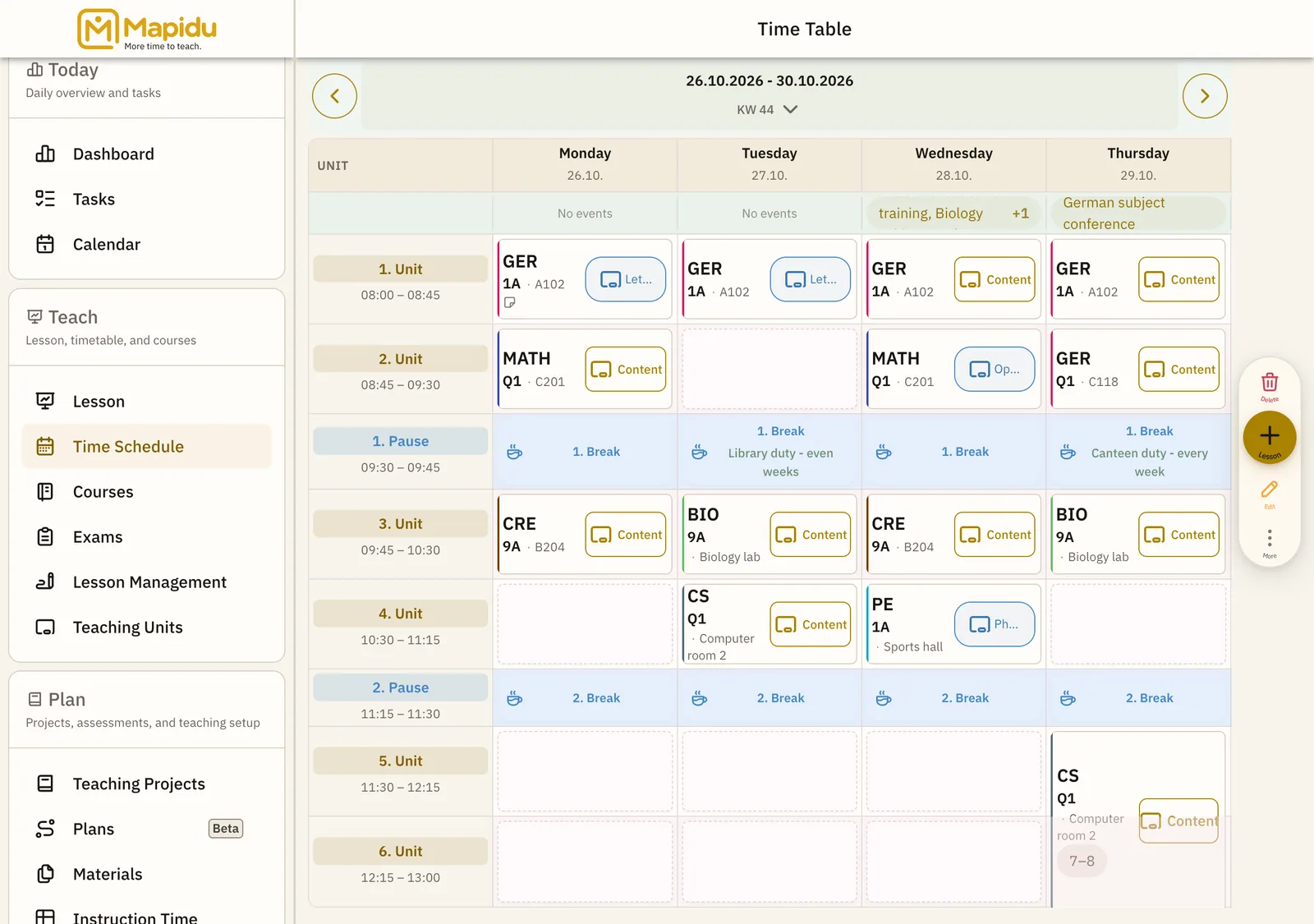
Screen elements
Week grid
A table of lesson times from Monday to Friday, with Saturday optional. It forms the main area of the timetable page. Scroll across and down whenever it does not all fit at once. This way the complete week sits in front of you.
Subject tiles
Coloured blocks per lesson, each with the subject abbreviation. They sit in the grid at the matching time and weekday. Simply tap a tile. Depending on the timing, details, prep, or the lesson then open.
Week navigation
Arrows that take you back and forward through the calendar weeks. You find them at the top of the timetable. Tap the left or right arrow. This way you plan and document for coming weeks too.
Breaks
Free, grey-shaded times between the blocks. They sit in the grid between the subject tiles. They are there only for orientation — no tap needed. This way it is instantly clear when there is no teaching.