
Diese Hilfe gibt es auf Deutsch und Englisch.
Today dashboard
Your whole day on one timeline — every lesson, event, and open task for today.
- Where to find it
- You find it under Menu → Today; it is also the home screen the moment you open the app.
- How to use it
- There you pick a day in the week strip, scroll through the timeline, and tap "Conduct lesson" on a period.
- What it does for you
- This way you start each day with a clear plan and jump into a lesson in a single tap.
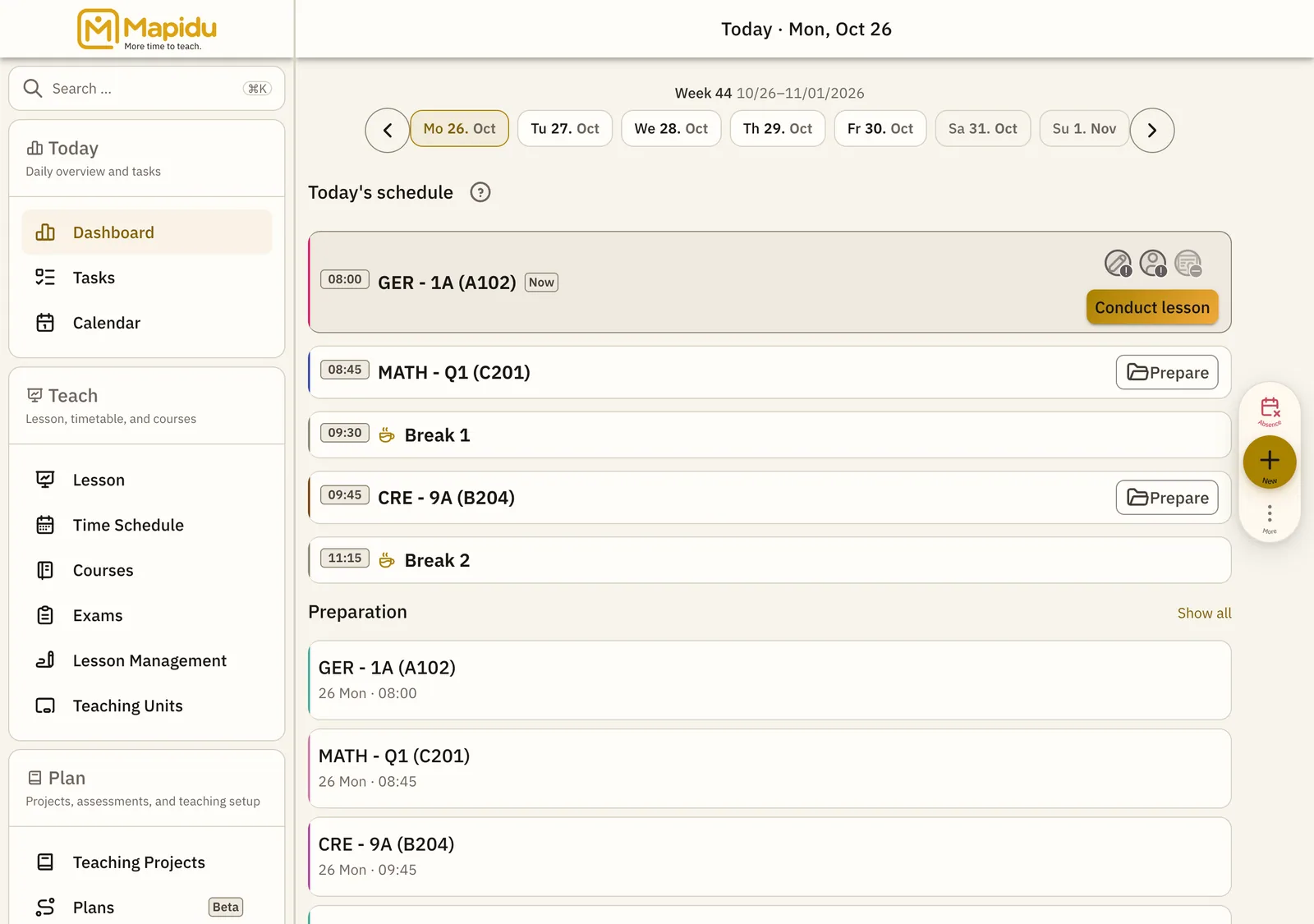
Screen elements
Week strip
A compact date picker for the school days of the current week. It sits at the very top of the dashboard, just below the title. Tap a day there, and the timeline jumps straight to it. This way you move between yesterday, today, and tomorrow without a detour.
Timeline
Here are all your lessons and events for the day, in time order. It fills the large area below the week strip. Just scroll down until you can see every entry. Order, subject, class, and room come across at a glance.
Status
Colours and hints show per lesson whether it is running, upcoming, open, or done. They appear right on the lesson entry itself. Usually a glance is enough; tap yellow hints for detail. This way you spot at once which lesson still needs your attention.
Conduct lesson
A button that starts the lesson for exactly this period. You find it on the right of the lesson entry. Tap it during or right after class. Attendance, participation, and the plan then open with no detour.